FREE & OPEN SOURCE FOR macOS

Your music. Your library.
Your crates.

Bringing the fun back to keeping your own music files. CrateDigger pairs the tactile joy of a hardware deck with a fast, multi-threaded engine for organising and batch converting a library. And since 2.0 it is also the app you open on a Tuesday night because you want to hear something: search it, play an album without a seam, and let it remember what you played. And since 2.1 it lives on your desktop too, as a native widget with the cover of what is playing, or a slideshow of your records when nothing is.

CrateDigger App Icon

Hardware-Level Curating

Toggle between Carbon (Dark) and Carbon (Light) modes and hover over the hotspots to tour the console.

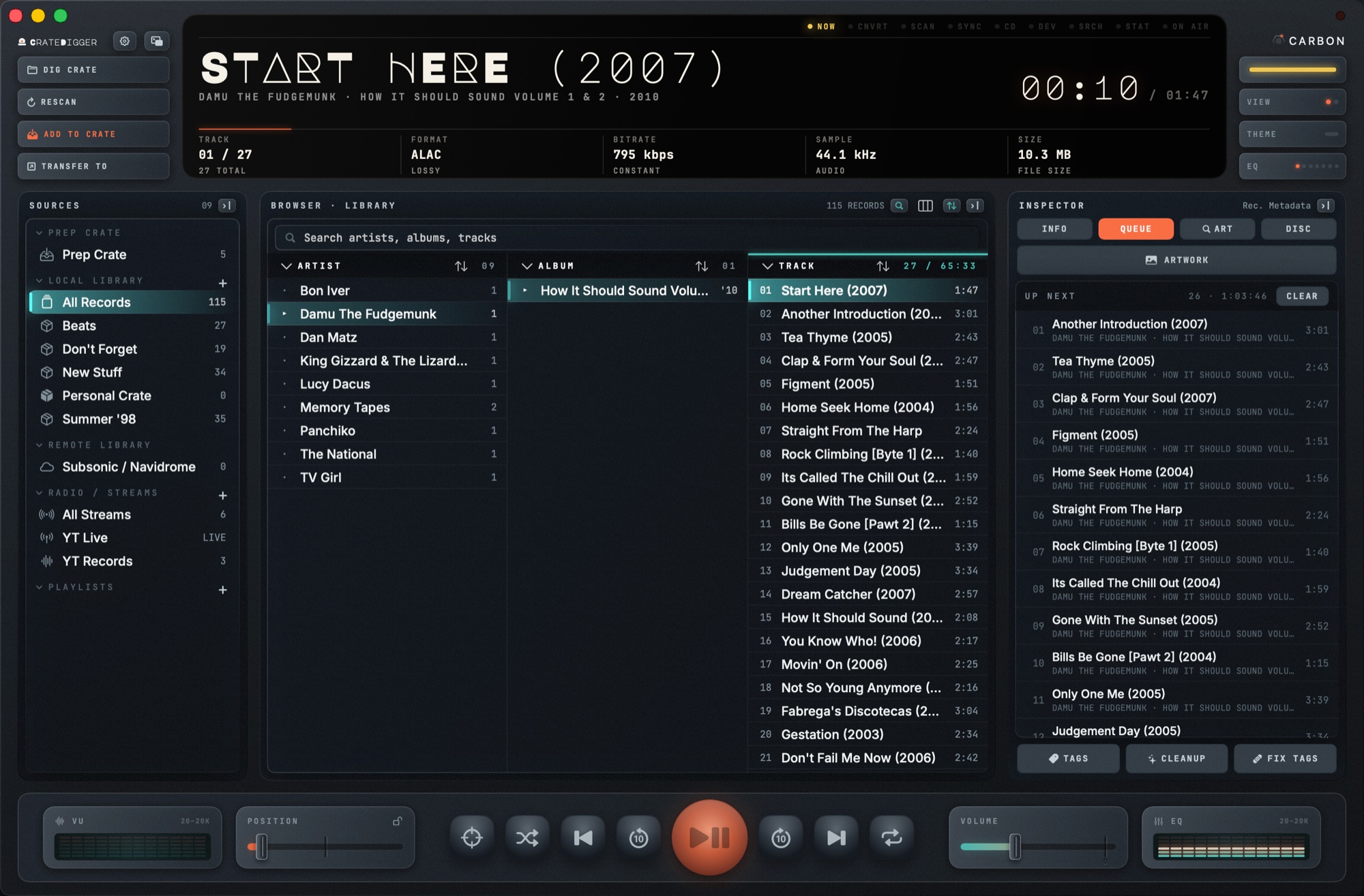
CrateDigger Interface Screenshot

Tactile Console Tour

Hover or click on the pulsing orange hotspots scattered on the console above to inspect CrateDigger's features and hardware components.

OLED LCD Status Row

Inspired by retro-modern receivers, the glowing OLED centre shows a high-fidelity readout: the playing track's tags, format, live bitrate and sample rate, file size, and an LCD scrub bar. Its views cycle through the VU meters, folder scan status, the conversion queue, SEARCH, and since 2.0 a STATS screen with your most played record, artist and track for the month, the year, or all time.

Double-Tier Crates Index

Organise offline tracks into portable, lightweight crates. A .cdcrate file is a plain JSON list of file paths, with the tags kept once in a shared store beside it, so a crate stays tiny no matter how large your library grows. The Prep Crate is the staging zone for newly scanned files, so you tag and review imports before they join your saved crates. While a search is live, every crate shows how many matches it holds, so the sidebar doubles as a map. Supports Subsonic and Navidrome libraries, CD audio ripping, mounted players, and local playlist files.

Active Tag & Artwork Inspector

Inspect nested audio tags and metadata details instantly, and rate a track one to five stars. Resolves embedded artwork dynamically, searches local folders for cover assets, and pulls high resolution covers from iTunes and Deezer. Pick a MusicBrainz release and it adds the Cover Art Archive's typed front, back and booklet scans, plus the deep pressing scans Discogs holds. Everything you fetch is staged and written only when you say so.

Physical Decks & VU Monitors

The bottom chassis hosts the mechanical audio control deck: cue loops (A to B repeat), playlist advance, shuffle, output device selection, a volume fader, hardware style EQ bands, and dual VU meters. An album recorded in one piece plays through it without a seam between tracks, and the whole deck folds down to a Mini Player with a light strip, Up Next and every source one click away.

New in 2.1

2.0 made your library livable. 2.1 puts it on your desktop.

🖼️

A Native macOS Widget

A small and a medium widget for the desktop and Notification Center. While a record plays it shows the cover, the track and a progress bar that moves on its own, or the cover followed by the album's booklet pages, scans or PDF, one a minute. Tap it and CrateDigger opens.

🎞️

Something to Look At in the Quiet

With nothing playing, the widget becomes a slideshow of covers from your whole library, the cover of the last album you played, or a clear panel with a line to get you digging. The wide one names the record beside its cover, with the crate it lives in or how long ago you last heard it. Pick in Settings.

↕️

Drag Up Next Into Order

Click, hold and drag a queued track onto another to move it there, or below the last one to send it to the end. A lit line shows where it will land, in the Inspector's queue and in the mini player's.

🎛️

A New Mini Player Deck

Title, band and album each get a line, the transport matches the main window's with a round play key that lights while it plays, and every corner follows your theme. One switch goes back and forth on ⇧⌘M. Tap a crate and it deals 20 shuffled tracks into Up Next, with another hand a tap away.

🧺

Empty the Prep Crate in One Click

Done auditing? A key beside the browser's search and sort controls clears the Prep Crate. It asks first, because clearing also forgets which folders you dug.

💽

Picard Rips Stay Whole

A multi-disc rip filed into subfolders like 01 - Digital Media and 02 - Digital Media used to show up as two albums. A folder that starts with a disc number now counts as a disc of its album.

New in 2.0

1.x made your library beautiful. 2.0 makes it livable.

🔎

Search Your Library

One field, one keystroke, results as you type across title, artist, album, path and format. Every crate in the sidebar shows its match count while the query is live, clicking one keeps the search applied, and one switch widens it to All Records.

🧭

Any Category in Any Column

The browser is no longer welded to Artist, Album and Track. Each column shows whatever facet you point it at: genre, year, decade, format, rating, album artist. Every crate remembers its own arrangement.

📈

A Library That Knows What You Play

Play count, skip count, last played, date added and rating, kept beside your crates and never written into your files. The STATS screen on the display reads it back: your most played record, artist and track for the month, the year, or all time.

⏯️

Pick Up Where You Left Off

Quit mid album and come back to the same track at the same second with the same queue. Up Next can be dragged into order, and Play Next and Play Last never interrupt what is playing.

🎼

Gapless Playback

The next track is buffered while the current one plays, so a live record, a mix or a symphony runs without the hole between tracks. Streams and DSD keep the classic path, and Advanced has an off switch for a stubborn output device.

🧬

DEEP SCAN

Eight untitled files from a split vinyl side? DEEP SCAN fingerprints each one, asks AcoustID and MusicBrainz what it is, and pairs every track to its slot on the record it came from. It never reads the tags, which is the whole point.

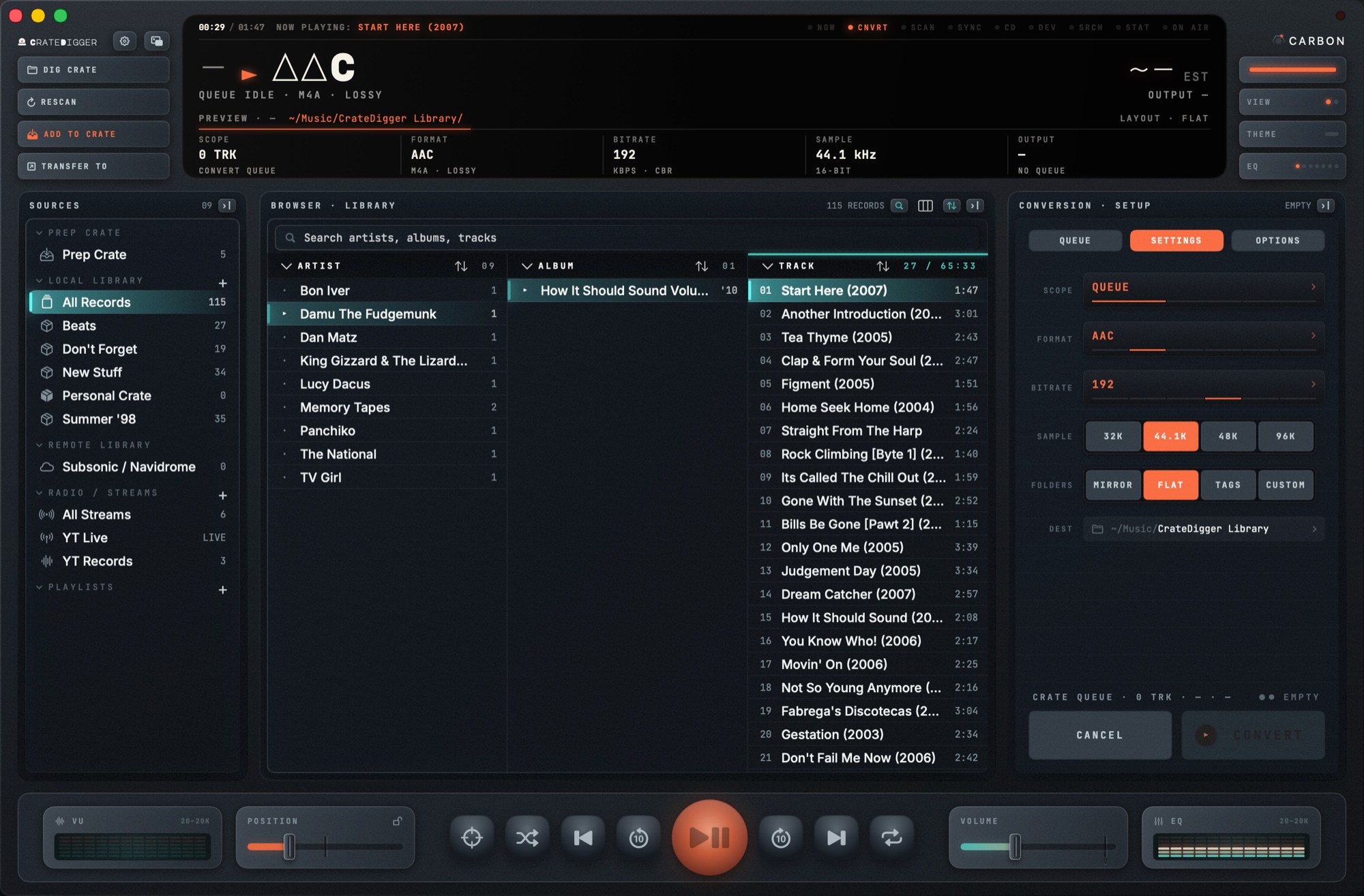
CrateDigger batch conversion Patch Bay view
Conversion Engine

Batch-convert your whole library, safely.

CrateDigger's FFmpeg engine queues entire directories of mixed formats at once, using every core but one. Every destination path is planned before a single file is written.

  • Flat, source-relative, or metadata-template folder output
  • Collision-safe naming — never silently overwrites a file
  • Review sheet shows every destination path before you commit
  • Preflight checks disk space and write permissions first
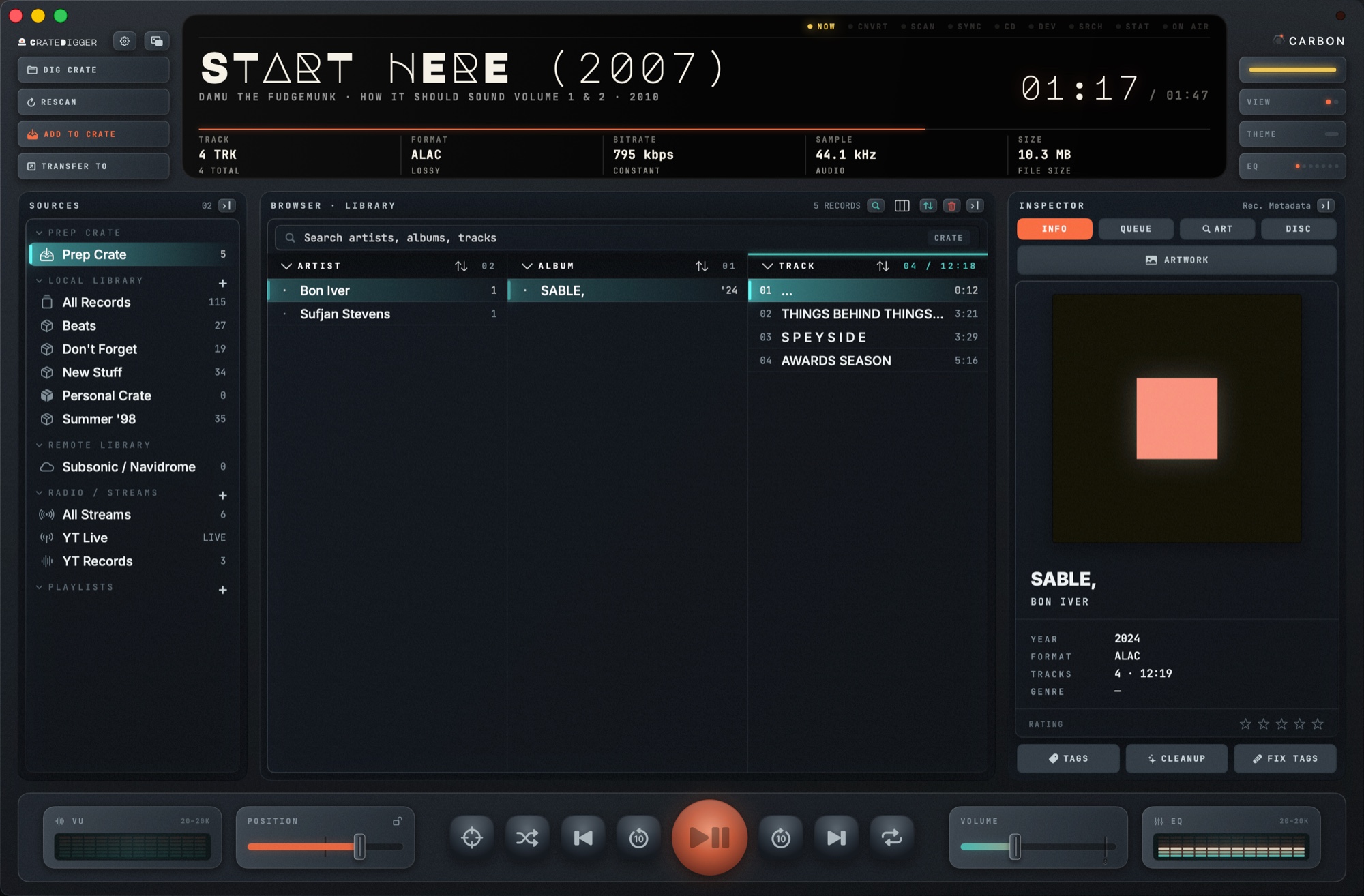
CrateDigger Prep Crate staging sidebar
Library Organization

Audit it before it joins your library.

CrateDigger started as a converter. The turning point was wanting to audit what you are about to convert: load a track, an album or a pile of untagged files, check the metadata, give it a listen, then decide. That became the Prep Crate, your library's inbox. Newly dug folders land there first, and nothing joins your crates until you drag it onto one.

  • Audit, listen, convert or clear, without touching your library
  • Drag what you keep onto the crate it belongs in
  • Crates, not just playlists: moods, work, classics, New Stuff, Don't Forget, Summer '98
  • Crates are portable, human-readable .cdcrate JSON files
  • No proprietary database, so your library folders stay yours
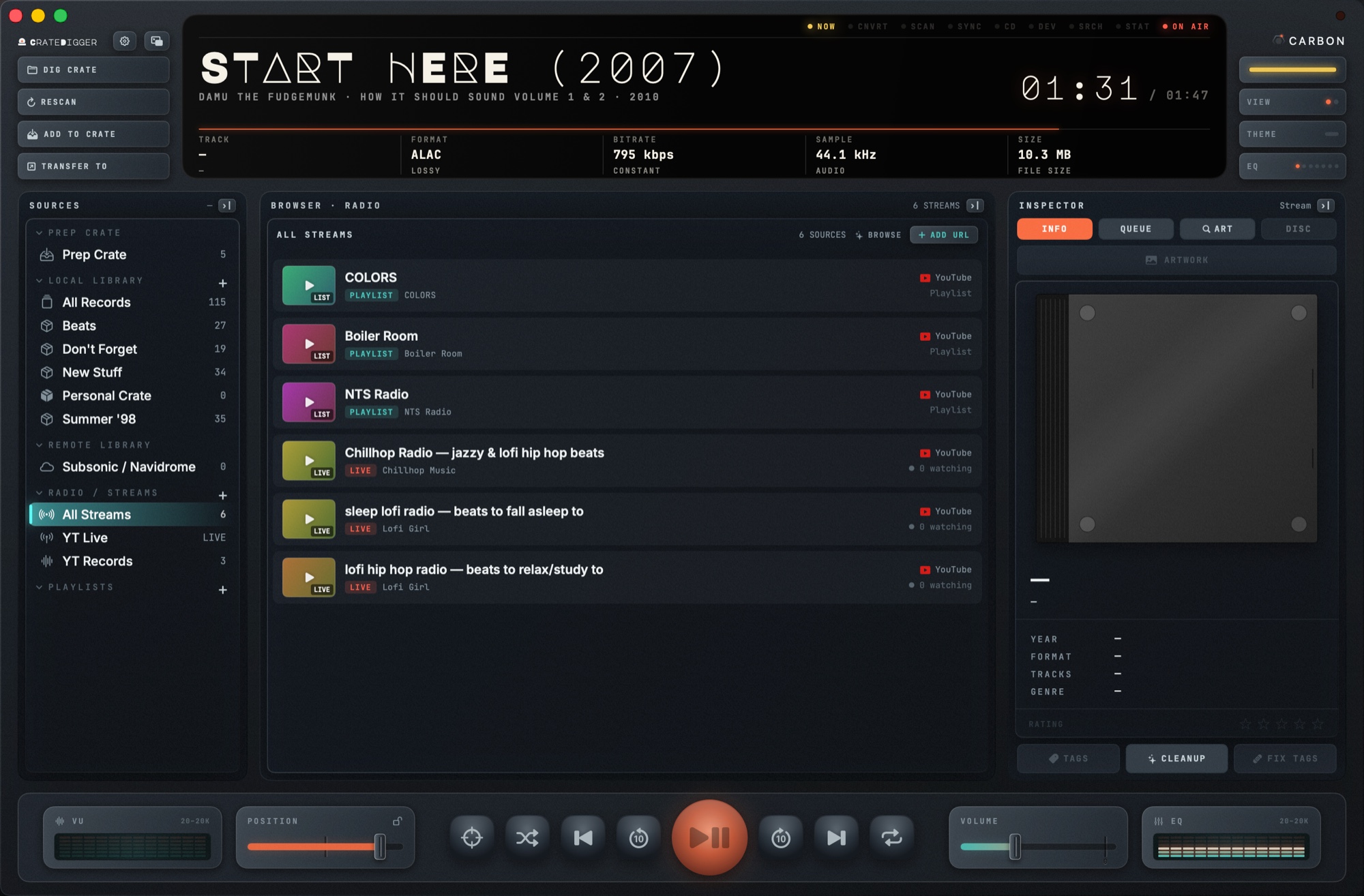
CrateDigger Radio streaming a YouTube source
Radio

Stream YouTube live sets and mixes, right in your library.

Paste a YouTube link and CrateDigger resolves it to a playable stream alongside your offline tracks — no separate app or browser tab.

  • Supports live streams, videos, mixes, and playlists
  • Sources grouped into sidebar categories like "YT Live" and "YT Records"
  • Chapter markers surface for long DJ sets and mixes
  • Same transport, EQ, and VU meters as local playback
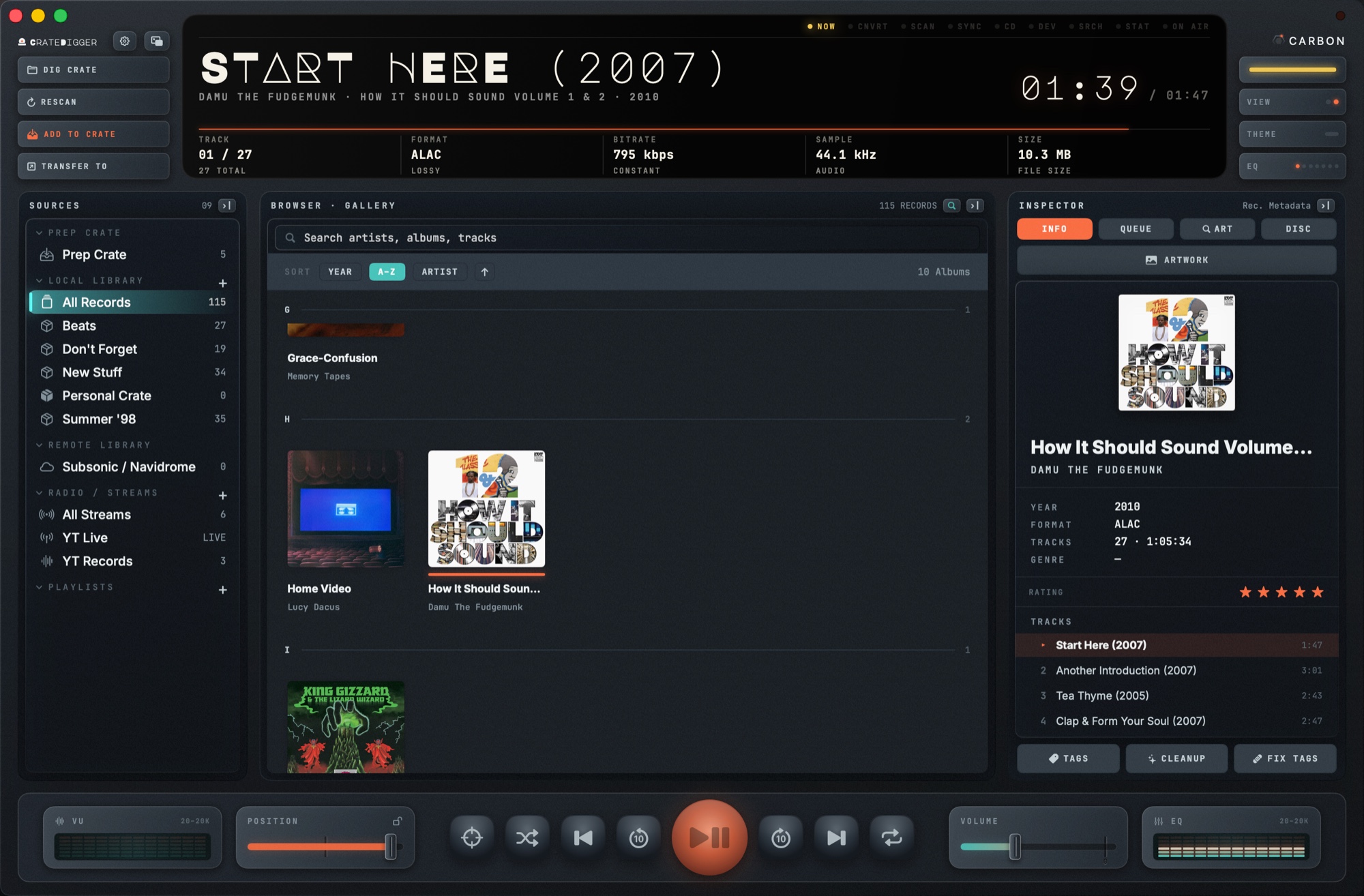
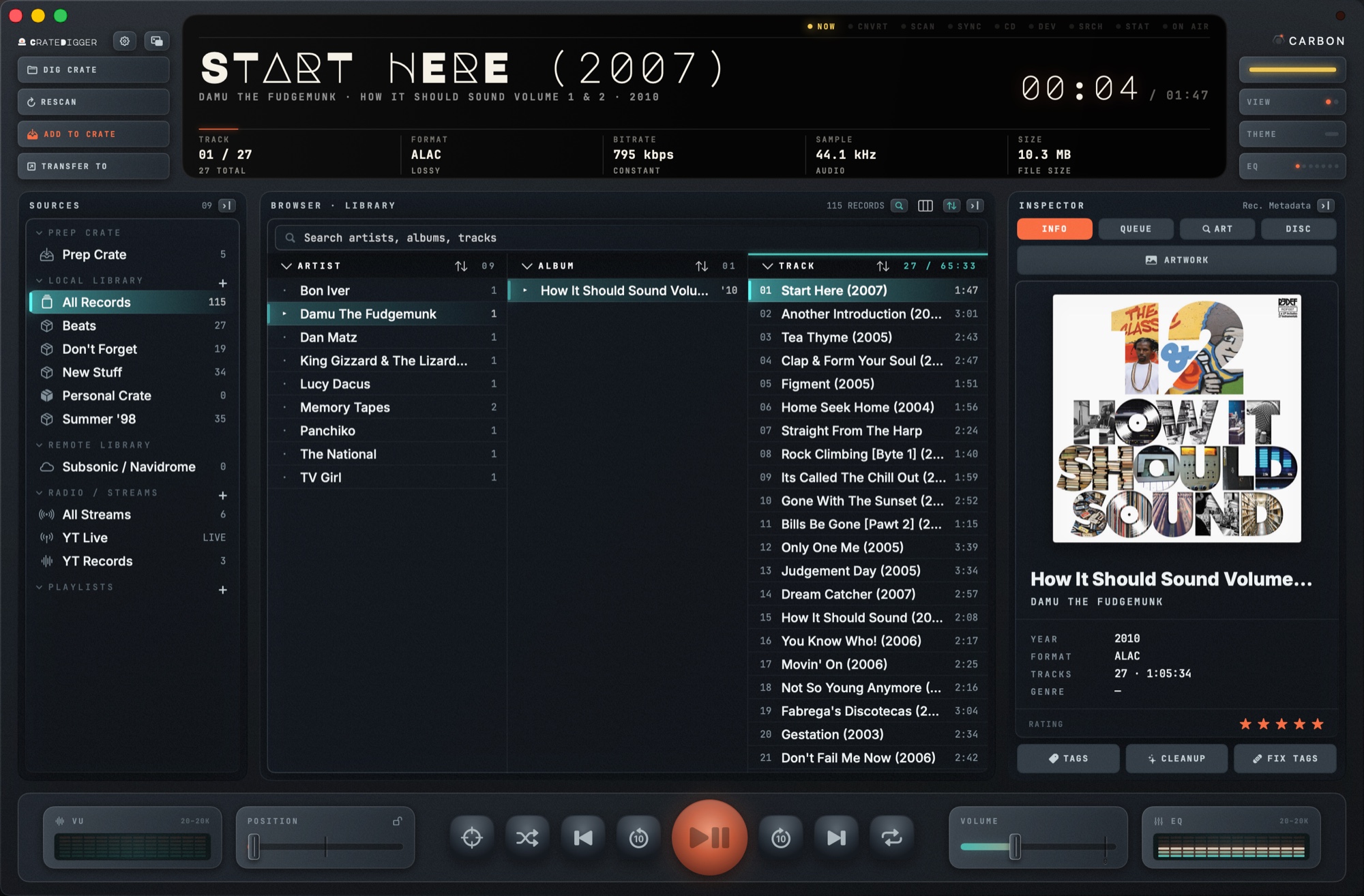
CrateDigger album artwork inspector and viewer
Artwork

See your covers the way they deserve to be seen.

The artwork inspector gathers embedded art, folder images and remote covers into one store, then opens them full size in a floating viewer, booklets and liner notes included, so you can read the story behind a record while it plays.

  • Falls back from embedded art → folder image → iTunes → Deezer
  • Pick a MusicBrainz release for typed Cover Art Archive scans — front, back, spine, obi, booklet pages
  • Supports album booklets — scanned inserts and liner-note PDFs
  • One shared artwork store keyed by hash, so covers load instantly across every crate
  • Batch cover fetch finds the best iTunes cover for a whole selection of albums and writes it into each folder
  • A CD or a record spins on the deck wearing the album's own disc scan, with the vinyl side on the label
CrateDigger Up Next queue in the Inspector
Up Next

A queue that moves the way you expect.

Play Next and Play Last never interrupt what is playing. The Inspector's QUEUE tab shows what is coming, and since 2.1 you click, hold and drag a track to put it where you want it.

  • Drag a track onto another to move it there, or below the last one to send it to the end
  • A lit line shows where the drop will land
  • Double-click to jump to a track, hover for remove, CLEAR for everything after the playing one
  • The same queue lives in the mini player, and quitting keeps it for next time
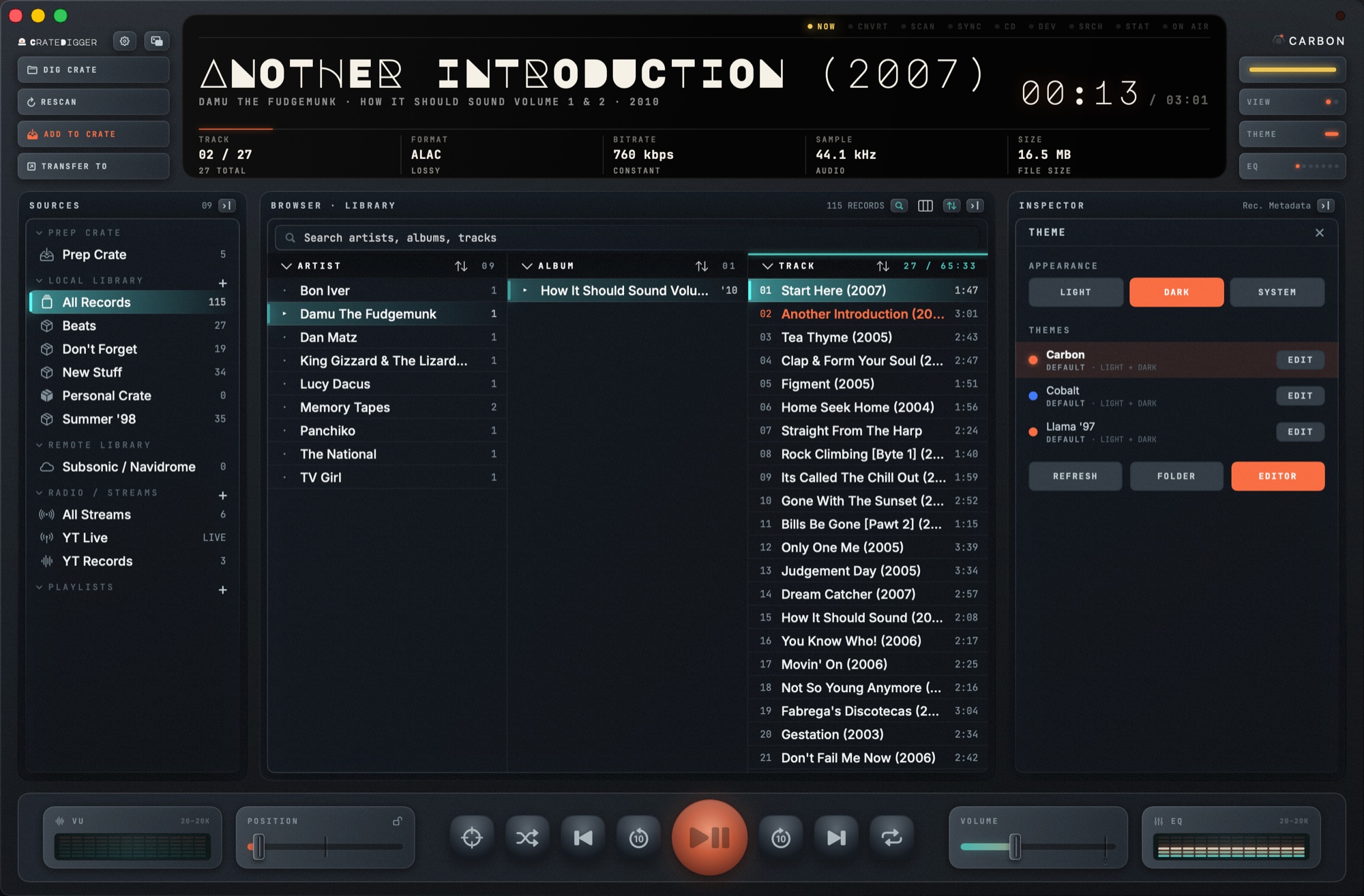
CrateDigger theme picker in the Inspector, Carbon light
Theming

Your console, your colours.

Press THEME for the picker, EDITOR to start changing one. Every colour, corner radius and typeface is a control, and the app repaints as you work, so the preview is the application behind the panel.

  • Carbon, Cobalt and Llama '97 ship with the app, each with a light and a dark side
  • Any font on your Mac can letter the interface, with the family's real weights
  • A finished theme is a small .cdtheme folder you can zip and send to anyone
  • Read the theming guide

Designed for Library Curators

We built CrateDigger because streaming services hide your music. It's time to own your files again.

✂️

Record Divider

Split one continuous vinyl-side rip into clean per-track exports. Auto-detects breaks from sustained silence, with a sensitivity slider and manual marker editing before you commit.

🔌

External Device Transfer

Push tracks straight to an iPod, USB drive, or phone with ⌘⇧T. Rockbox players get a cover.jpg written beside the album so art draws in colour, and FIX ART repairs a player you filled years ago without re-sending a file.

🛡️

Sandbox & Preflight Safety

Runs fully sandboxed with security-scoped bookmarks for every folder you grant access to. Every batch job checks destination write permissions and free disk space before it starts.

💿

CD Ripper & Subsonic Client

Rip physical CD audio tracks directly to FLAC or MP3. Connect to your Navidrome, Subsonic, or local streaming servers to sync remote crates and cache files offline.

⚡

Build Your Own Console

Press THEME, then EDITOR: every colour, corner radius, and typeface is a control, and the app repaints behind the panel as you drag, so the preview is the application. One theme carries its own light and dark versions, fonts travel bundled inside it, and UNDO steps back ten changes. Since 2.0 a theme can carry its own logo for the header, and the parts that light up have their own colours, so a console built around black finally has LEDs that work. Four themes ship; the rest is yours. Read the theming guide.

⬇️

It Updates Itself

No more fetching a DMG and dragging the app across by hand. CrateDigger checks quietly once a day, verifies the new build was signed by us, installs it, and relaunches. Betas live on their own feed, so a stable install is never handed one unless you ask for it in Advanced.

🗂️

Move & Consolidate

Point your Music Folder somewhere new and CrateDigger moves every file and repoints every crate that referenced them. Consolidate pulls strays from all over your disk into one place; the folder tree can keep itself organised by album artist as you edit tags.

📊

Last.fm & Metadata Probes

Scrobble plays to Last.fm with now playing indicators, and keep your own play counts whether or not you have an account. Rich probing via FFprobe extracts sample rates, exact encoding channels, profiles, and hidden streams.

🎚️

A Real 12-Band EQ

Twelve bands from 20 Hz to 20 kHz, a live spectrum on the meters, three presets of your own, and AutoEQ import, so a correction curve for your headphones drops straight in.

💎

DSD on Your Terms

DSF and DFF play bit perfect over DoP when your DAC takes it, or decode to PCM when you would rather. Leave it on Auto and CrateDigger picks for each output device.

🏷️

FIX TAGS

Looks an album up on MusicBrainz and iTunes, ranks the candidates, and shows every proposed change before anything is written. When the tags are too far gone to search with, DEEP SCAN listens to the audio instead.

🧹

Library Cleanup

The CLEANUP key relinks tracks whose files moved, finds duplicates, and flags albums whose covers are too small. Tracks on a disconnected drive or gone from disk are marked, so you can find them again.

📚

Every Pressing, One Release

Own a record three times over? Group the original, the remaster and the deluxe under one release that unfolds to show each pressing, or gather box sets and compilations. Grouping sits on top of your library, so no file is touched.

🌙

Sleep Timer

Fall asleep to a record. Stop after a set time, at the end of the track, or when Up Next runs out.
How CrateDigger Compares

The landscape of offline music managers is either bloated or looks like a spreadsheet. CrateDigger bridges the gap.

Feature CrateDigger Apple Music / iTunes Foobar2000 Plex / Navidrome Swinsian
Batch FFmpeg Conversion ✓ Yes (Built-in, Multi-threaded) ✗ Single file only (AAC/ALAC) ✓ Yes (Built-in converter + CD ripping) ✗ No (On-the-fly streaming transcode only) ✗ No (Playback-only, no transcoding)
Tactile Hardware Interface ✓ Yes (+ full in-app theme editor) ✗ No (Modern flat list style) ✗ No (Windows-classic sheet grids) ✗ No (Responsive grid layout) ✗ No (Standard native list/table UI)
Collision-Safe Path Renamer ✓ Yes (Flat / Template / Mirror) ✗ No (Forces proprietary folders) ✓ Yes (Complex tag-scripts) ✗ No (Requires prep-organized folders) ✗ No (No batch export/rename)
Double-Tier Crate Staging ✓ Yes (Prep Crate vs. Saved Crates) ✗ No (Imports directly to main database) ✗ No (Flat playlists only) ✗ No (Monolithic library folders) ✗ No (Flat/smart playlists only)
JSON Portable Libraries ✓ Yes (Lightweight .cdcrate files) ✗ No (Locked in binary SQLite/XML db) ✗ No (Proprietary database binary) ✗ No (SQL databases on server host) ✗ No (Proprietary internal library)
Native macOS Performance ✓ Yes (AppKit/SwiftUI + Sandbox) ✓ Yes (Native, but bloated) ✓ Yes (Genuine native macOS build) ✗ No (Electron client or web browser) ✓ Yes (Native, lightweight)

Under the Hood

Audio Pipeline

FFmpeg 8.1 and FFprobe, bundled as static binaries, plus fpcalc for fingerprinting. Asynchronous jobs through ProcessCommandRunner pipelines, with one worker per core but one.

OS Platform

Built exclusively for macOS 13+ (Ventura, Sonoma, Sequoia, Tahoe) on Apple silicon. Native Swift, AppKit bridging, and SwiftUI components. Ships as a signed, notarized DMG that updates itself over a signed appcast.

Storage & Formats

Decodes FLAC, ALAC, WAV, MP3, AAC, AIFF, OGG and M4A, and plays DSD (DSF and DFF) bit perfect over DoP where the output device allows it, decoding to PCM otherwise. Persists libraries via security-scoped bookmarks, lightweight .cdcrate path lists, one shared track store, a listening history store, and a hash-keyed artwork store. No index file ever carries image bytes.

Hardware Safety

Supports sandbox environments. Validates batch preflight destinations for write permissions and disk-space estimates prior to encoding runs.